Join NineWin Casino Online — Register Today and Claim Your Welcome Reward

Creating an account at NineWin Casino takes under three minutes. You fill in your details, verify your email, and gain instant access to 6,000+ games plus a welcome package worth up to £450 and 250 free spins across your first three deposits. The process works identically on desktop, Android, and iOS - no app download required to get started.

Up to £450 · 3 deposits
Registerwith bonus
Why Creating an Account Unlocks Everything

NineWin Casino launched in 2024 under Pointissimo B.V., licensed by Curacao eGaming (licence B2C-SFED5WMV-1668JAZ). Without an account you can browse the lobby, but you cannot place real-money bets, claim the ninewin deposit bonus, or participate in tournaments. Registration is the single step that opens all of that.

The welcome package is split across three deposits:

Deposit Bonus Free Spins
1st deposit 100% up to £150 150 spins
2nd deposit 55% up to £150 100 spins
3rd deposit 100% up to £150 -

Each stage requires a minimum deposit of £15 and carries a 35x wagering requirement (applied to bonus plus deposit) within 7 days. Free spins are valued at £0.10 each; winnings convert to bonus funds subject to the same 35x wager.

Where to Find the Registration Button

On desktop, the 'Register' button sits in the top-right corner of the NineWin homepage - it stays visible on every page once you scroll. On mobile browsers (Chrome, Safari) the button appears in the same position in the condensed header. Inside the Android APK (downloaded from the official NineWin site only), tap the avatar icon in the top-right to reach the sign-up screen. There is no separate iOS app at launch, but the mobile browser version is fully responsive and renders the registration form without any layout issues.

Open Registration Form

Registration Method: Email Only

NineWin currently supports email-and-password registration. There are no social login options (Google, Facebook) and no phone-number-only sign-up path. You will need a valid, accessible email address from the start - it is used for verification, bonus notifications, and account recovery.

When choosing a username, pick something you will remember but that does not include personal identifiers (your full name, date of birth). The system rejects usernames already taken, so have a fallback ready.

Who Can Register: Country and Age Requirements

NineWin accepts players from 30+ jurisdictions under its Curacao licence. The following territories are blocked: United Kingdom (note: some affiliate promotions target UK players - always check the current terms), USA, Russia, France, Spain, Netherlands, Ukraine, and around 15 other jurisdictions listed in the Terms and Conditions.

The minimum age is 18 years. The platform verifies age during the KYC process before approving any withdrawal. Attempting to register with false date-of-birth data will result in account suspension and forfeiture of winnings.

Players from the UK, USA, Russia, Ukraine, France, Spain, and several other listed countries are restricted. Check the full restricted-territories list in the Terms and Conditions before depositing.

Confirming Your Account: Email Verification

After submitting the registration form, NineWin sends a confirmation email within a few minutes. Click the link inside to activate your account. Common issues:

  • Email lands in spam or promotions folder - move it to inbox and click the link.
  • Link expires after 24 hours - use the 'Resend confirmation' option on the login screen.
  • Typo in the email address during sign-up - contact live chat (available 24/7) to correct it before the link expires.

There is no SMS verification step at registration, though a mobile number is collected in the form for account security purposes.

Step-by-Step Registration Process

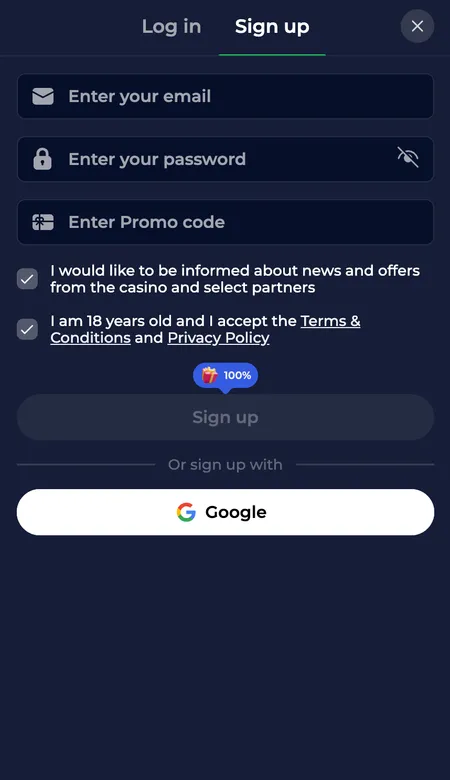
  1. NineWin registration form step one

    Step 1 - Open the form. Click 'Register' on the NineWin homepage. The form loads on the same page. Fill in your email address, choose a username, and create a password (minimum 8 characters, mix of letters and numbers recommended).

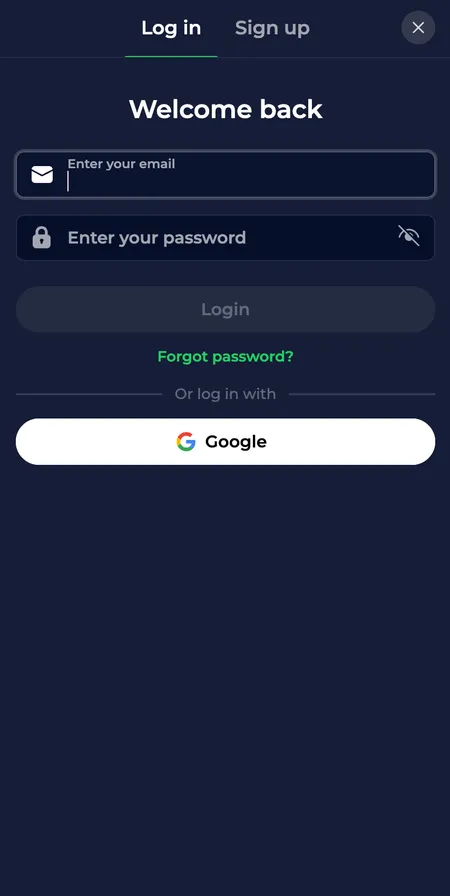
  2. NineWin login screen after account creation

    Step 2 - Complete details and log in. Enter your full name, date of birth, home address, and mobile number. Select your account currency (GBP, EUR, or USD). Accept the Terms and Conditions, confirm you are 18+, then click 'Create Account'. After email verification, use the login screen to access your new profile.

What the Registration Form Asks For

The form collects the following in a single screen:

  • Email address and chosen username
  • Password (case-sensitive; use a unique one not shared with other sites)
  • Full legal name and date of birth
  • Residential address (street, city, postcode/ZIP, country)
  • Mobile phone number
  • Account currency selection
  • Optional: promotional code field (enter codes like NINE20 here for 100% up to €500 on your first deposit)

All fields are mandatory except the promo code. The currency you select at sign-up cannot be changed later, so choose carefully - GBP is the natural choice for players in the United Kingdom.

Claim Your Welcome Bonus

Registering on Different Devices

NineWin runs in any modern browser. The form works the same whether you are on a Windows PC, Mac, iPhone, or Android phone. No Flash or plugins are required.

Device Method Notes
Desktop Browser Full form, all fields visible
Android Browser or APK APK from official site only
iPhone / iPad Safari or Chrome PWA installable via share button

The PWA (Progressive Web App) can be added to your home screen via the browser's share menu. It behaves like a native app, loads faster on repeat visits, and sends push notifications for bonuses and promotions.

For the Android APK: download only from ninewin.com. Third-party APK sources carry security risks and may contain modified files. After installing, biometric login (fingerprint) can be enabled in the app settings.

Registering via the Mobile App

If you download the Android APK, the registration screen inside the app is identical to the web version. The main practical advantage is that the app saves your session, so you stay logged in between visits. Biometric authentication (fingerprint unlock) is available on supported Android devices, which removes the need to type your password each time.

The app also sends push notifications for tournament start times, bonus expiry reminders, and new promotions - useful if you want to track the 7-day wagering window on your welcome bonus.

Your First Login After Registration

Once email verification is complete, click 'Login' in the top-right corner. Enter your username (not email) and password. The dashboard opens showing your balance, active bonuses, and the game lobby.

First things to do after login:

  1. Check the Bonuses section to confirm your welcome offer is active.
  2. Set deposit limits under Responsible Gaming (daily, weekly, monthly).
  3. Upload KYC documents early to avoid delays when you first withdraw.
  4. Enter any promo codes you have in the Promotions section.

Auto-login is available in the app once you enable biometrics; the browser will offer to save your credentials if you allow it.

Common Registration Problems and Fixes

'Username already taken' - Try adding a number or switching word order. Usernames are unique across all NineWin players.

Confirmation email not arriving - Check spam, wait 5 minutes, then use 'Resend'. If still nothing, contact live chat - they can manually verify the address.

'Country not supported' error - Your IP address or selected country is in the restricted list. A VPN does not bypass this check; the platform cross-references multiple signals.

Form not submitting - Usually a missed mandatory field or an invalid phone format. Phone numbers must include the international dialling code (e.g. +44 for the UK).

Page loading slowly - Clear browser cache or try a different browser. The registration page is lightweight, so persistent slowness suggests a network issue on your end.

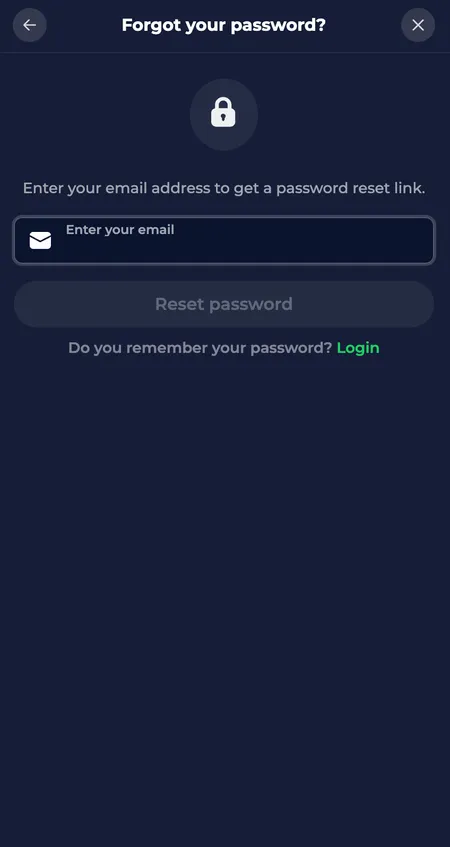
NineWin password reset screen

If you forget your password before completing registration, use the 'Forgot Password' link on the login screen. Enter your registered email and follow the reset link sent to your inbox.

Choosing a Secure Password

NineWin does not enforce two-factor authentication at registration, which makes your password the primary line of defence. Use a password that:

  • Is at least 12 characters long
  • Combines uppercase, lowercase, numbers, and symbols
  • Has not been used on any other site

The casino recommends not saving your password in shared devices and not sharing payment details with third parties. For extra protection, use a dedicated email address for gambling accounts. Once logged in, you can update contact details and notification preferences from your profile settings.

NineWin uses 256-bit SSL encryption and TLS 1.2 protocol on all pages, including the registration form. Your personal data is transmitted in a fully encrypted environment from the moment you start typing.

KYC Verification After Sign-Up

You can play and deposit immediately after registration, but withdrawals require KYC (Know Your Customer) verification. Documents needed:

Document type Accepted formats
Government-issued ID Passport, national ID card, driving licence
Proof of address Utility bill or bank statement, dated within 3 months
Payment method proof Card photo or e-wallet screenshot (if requested)

Processing takes 24-72 hours. Submitting documents early - before you are ready to withdraw - avoids delays. The platform's KYC policy also aligns with AML (anti-money laundering) requirements: there is a one-time deposit wagering requirement before the first withdrawal is approved.

Start Registration at NineWin

Registration and Your Welcome Bonus

The ninewin bonus package activates automatically on your first three deposits - you do not need a code unless you want an alternative offer. If you have the code NINE20, enter it during registration or in the promotions section for a 100% match up to €500 on your first deposit instead of the standard £150.

Key bonus rules to read before depositing:

  • Max bet while a bonus is active: £5 on slots, £10 on live games
  • Max withdrawal from bonus winnings: 10x the bonus amount
  • Slots contribute 100% to wagering; live casino games contribute 0%
  • Bonuses are Non-Sticky: your real money balance can be withdrawn at any time, even with an active bonus

For more detail on all current offers, visit the bonuses page.

Managing Your Profile After Registration

Inside your account you can update notification preferences, change your password, set deposit limits, and configure self-exclusion periods (6, 9, or 12 months, or indefinitely). Reality checks (session time reminders) can also be enabled. These tools are under the Responsible Gaming section and take effect immediately.

The home page of NineWin review has a full overview of what the platform offers once your account is active, including the VIP programme, cashback structure, and tournament schedule.

Registration FAQ

How long does registration take?

Filling in the form takes 2-3 minutes. Add another 2-5 minutes for the confirmation email to arrive and the verification click. Total: under 10 minutes from start to first login.

Can I register from the UK?

The United Kingdom appears in NineWin's restricted territories list in the operator's terms. Check the current terms on the official site before registering.

What currency should I choose?

Choose GBP if you hold a UK bank account or card. Currency selection is permanent - it cannot be changed after registration without contacting support.

Is there a no-deposit bonus after registration?

NineWin's main welcome offer requires a deposit. Any bespoke no-deposit offers are capped at around £50 in winnings unless stated otherwise. Check the Promotions section after login.

What if my confirmation email never arrives?

Wait 5 minutes and check your spam folder. If still nothing, use the 'Resend confirmation' link on the login page. If the problem continues, contact live chat - available 24/7 in English.

Can I have more than one account?

No. NineWin permits one account per person, per household, and per device. Duplicate accounts result in suspension and forfeiture of bonuses.

Do I need to verify my identity to play?

You can play immediately after email confirmation. KYC documents are required only before your first withdrawal. Submitting them early speeds up the payout process.

How do I enter a promo code?

There is a promo code field on the registration form. You can also enter codes in the Promotions section after login. The code NINE20 gives 100% up to €500 on your first deposit.

What documents are needed for KYC?

A valid government-issued photo ID, proof of address dated within 3 months, and occasionally a proof of payment method. Processing takes 24-72 hours.

Is the registration form secure?

Yes. NineWin encrypts all data with 256-bit SSL and TLS 1.2 protocol. The form is served over HTTPS and all input is encrypted in transit.

Your NineWin account is three minutes away. Sign up now, make your first deposit from £15, and activate up to £450 in welcome bonuses plus 250 free spins.